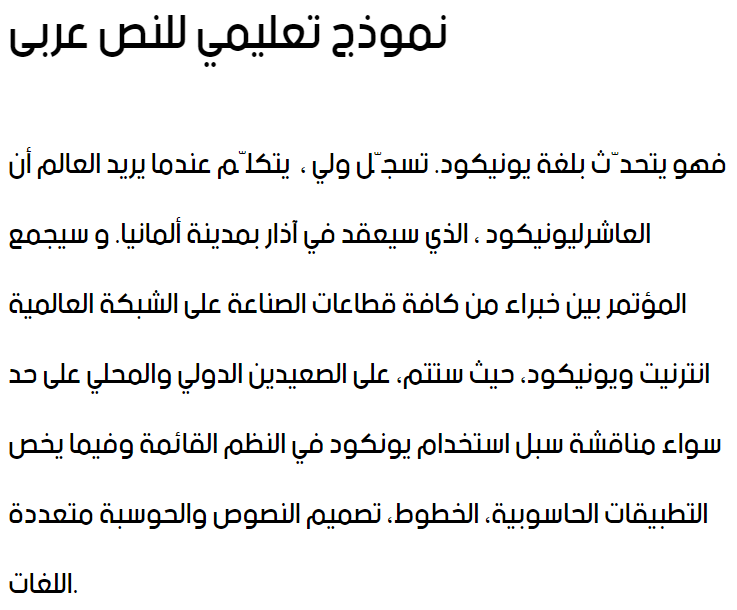
Free Download Be In Normal

Be In Normal is most popular/used font in the State of Saudi Arabia. Project name of this font is beINNormal. Personaly feel free to use Be In Normal but when you use this font commercially please contsct- Copyright 2013. beIN Corporation, All Rights Reserved..

Please complete humanity verify use captcha code below for download Be In Normal font.


More Information of Be In Normal

✓ Copyright 2013. beIN Corporation, All Rights Reserved.
✓ beIN Normal
✓ Regular
✓ beINCorporation: beIN Normal : 2013
✓ beIN Normal
✓ beIN version 1.0
✓ beINNormal
✓ beIN-Arabic is a trademark of beIn Corporation.
✓ beIN Corporation
✓ Fahd Al Fraikh
✓ Copyright (c) 2013 by beIn Corporation. All rights reserved.
✓ www.emptyskyarts.com
✓ Copyright 2013. beIN Corporation, All Rights Reserved.
✓ beIN Normal
✓ Normal
✓ beIN Normal


If captcha not working, click on Reload button & try again.
format_size
text_rotation_none
format_line_spacing
Be In Normal Arabic Font

Convert any font to any font, like ttf to eot, svg, woff & more!!!   click here >>

Short Details of beINNormal.ttf

Font Family : beIN Normal
Font Subfamily : Regular
Font Identifier : beINCorporation: beIN Normal : 2013
Full Name : beIN Normal
Version : beIN version 1.0
Postscript Name : beINNormal
Download : 2327 Times
Copyright : Copyright 2013. beIN Corporation, All Rights Reserved.
How to install Be In Normal in your computer?

For Windows 7 / Vista users:
- Right-click the Be In Normal font file(s) and choose "Install".

For users of the previous Windows versions:
- Copy Be In Normal font & pest into a default Windows font folder (usually C:\WINDOWS\FONTS or C:\WINNT\FONTS)

For Mac users:
Mac OS X 10.3 or above (including the FontBook)
- Double-click Be In Normal font file and hit "Install font" button at
the bottom of the preview.

Mac OS X
- Either copy the Be In Normal font file(s) to /Library/Fonts (for all users), or to /Users/Your_username/Library/Fonts (for you only).

Mac OS 9 or earlier
- You have to convert the Be In Normal font file(s) you have downloaded. Drag the font suitcases into the System folder. The system will propose you to add them to the Fonts folder.

For Linux users:
- Copy the Be In Normal font file(s) to /USR/SHARE/FONTS
Random Fonts

Al Shark Title Black Arabic Font
Al Shark Title Black
Download
View Count : 1760
Sp_Jadid Bold Arabic Font
Sp_Jadid Bold
Download
View Count : 1593
Emirates Medium Arabic Font
Emirates Medium
Download
View Count : 2891
MCS Diwany3 S_U Normal Arabic Font
MCS Diwany3 S_U Normal
Download
View Count : 878
Hacen Algeria Arabic Font
Hacen Algeria
Download
View Count : 1813
AGA Arabesque Desktop Arabic Font
AGA Arabesque Desktop
Download
View Count : 2624
A Sahand Arabic Font
A Sahand
Download
View Count : 1461
Most Downloaded
DecoType Thuluth II Arabic Font
DecoType Thuluth II
Download
View Count : 234445
AlHurraTxtBold Arabic Font
AlHurraTxtBold
Download
View Count : 105803
AlHadari Arabic Font
AlHadari
Download
View Count : 65561
Aldhabi Arabic Font
Aldhabi
Download
View Count : 51996
Zapfino Arabic Arabic Font
Zapfino Arabic
Download
View Count : 38579

close
Please like, if you love this website
Privacy Policy   GDPR Policy   Terms & Conditions   Contact Us